

Biometric time clock systems enhance workforce efficiency by automating attendance tracking, reducing time theft, and giving managers accurate, real-time insights into employee hours.
Running a business efficiently starts with knowing exactly how your team spends their time. Yet studies show employees are productive for only about 60% of the workday, with the rest lost to interruptions, administrative tasks, and inefficiencies, according to workplace productivity research.
When attendance tracking relies on manual logs or shared PIN systems, time theft, buddy punching, and payroll errors can quietly drain productivity and profits. Managers often lack the accurate, real-time data needed to make smart staffing decisions. That’s where biometric time clock systems come in.
By using fingerprint or facial recognition to verify employee attendance, these systems eliminate guesswork, streamline payroll, and give businesses the reliable workforce data they need to improve accountability and enhance operational efficiency.
What Is a Biometric Time Clock System and How Does It Work?
A biometric time clock system is a workforce management tool that uses unique physical characteristics — such as fingerprints, facial recognition, or iris scans — to verify employee identity when clocking in or out. Instead of relying on PINs, swipe cards, or paper logs, the system confirms that the actual employee is present, making attendance records far more accurate.
When an employee clocks in, the system scans the chosen biometric identifier and compares it to the encrypted template stored in the system. If the match is confirmed, the time entry is recorded instantly in the company’s attendance database and can sync directly with payroll or HR software.
Biometric verification eliminates common time-tracking loopholes like buddy punching while creating a reliable digital record of employee hours. This combination of identity verification and automated tracking helps businesses maintain accurate payroll data and improve workforce accountability.
How Do Biometric Time Clock Systems Improve Workforce Efficiency?
Biometric time clock systems help businesses streamline workforce management by automating attendance tracking and ensuring that employee time records remain accurate. When organizations remove manual processes and identity loopholes, they gain clearer workforce data and reduce time spent correcting payroll errors.
Eliminating Buddy Punching and Time Theft
Buddy punching occurs when one employee clocks in for another, inflating paid hours and reducing overall productivity. Biometric verification ensures only the correct employee can clock in, preventing this practice and protecting payroll accuracy.
Automating Time Tracking and Payroll
Manual timesheets and PIN-based systems often require managers to review and correct errors before payroll is processed. Automated time tracking sends verified attendance data directly to payroll systems, reducing administrative workload and minimizing costly mistakes.
Improving Attendance Accountability
When employees know their time is tracked through biometric verification, attendance habits often improve. This accountability helps businesses maintain reliable staffing levels and ensures teams remain properly scheduled to meet operational demands.
Providing Real-Time Workforce Data
Biometric systems give managers instant visibility into who is clocked in, late, or absent. Real-time workforce data helps managers make faster staffing decisions and quickly address scheduling gaps before productivity is affected.
The Key Benefits of Using Biometric Time Clocks
Biometric time clocks offer more than just accurate attendance tracking — they provide businesses with tools to streamline operations and strengthen workforce accountability. By replacing manual processes with automated identity verification, companies gain reliable data that supports better workforce management.
Increased Accuracy in Employee Attendance
Traditional timekeeping methods often rely on cards, PINs, or manual logs that can be lost, shared, or entered incorrectly. Biometric verification creates a unique match between the employee and the time entry, which significantly reduces errors and ensures that attendance records remain dependable.
Reduced Administrative Work for Managers
Managers frequently spend hours reviewing timesheets, correcting mistakes, and resolving payroll discrepancies. Automated attendance records reduce manual oversight by syncing verified employee hours directly with payroll and HR systems.
Improved Accountability Across Teams
Clear and accurate time tracking encourages employees to follow schedules and maintain consistent attendance. When everyone clocks in using biometric verification, businesses create a transparent and fair system that strengthens workplace accountability.
Things Businesses Consider Before Implementing Biometric Time Clocks
Before implementing biometric time clock systems, businesses should take time to evaluate several operational and compliance factors. Careful planning helps ensure the technology integrates smoothly with existing processes while addressing potential privacy concerns and employee adoption challenges.
One important consideration is data security and privacy. Because biometric systems collect identifiers such as fingerprints or facial recognition data, businesses must ensure this information is encrypted and stored securely while following applicable privacy and data protection regulations.
Integration with existing systems also plays a key role in long-term efficiency. Biometric time clocks deliver the most value when they connect directly with payroll and HR software, allowing attendance data to sync automatically and reducing the need for manual data entry.
Employee adoption should not be overlooked during implementation. Providing training and clear communication about how the system works helps employees understand its purpose, which can improve acceptance and ensure the technology becomes a seamless part of daily workforce management.
FAQs
Are Biometric Time Clocks Compatible With Mobile Workforces?
Yes, many modern biometric systems offer mobile or cloud-based options, allowing employees to clock in remotely using smartphones or tablet-mounted scanners. This flexibility supports hybrid teams and field staff while maintaining the same level of accurate attendance tracking as on-site systems.
Can Biometric Systems Track Overtime and Breaks Automatically?
Biometric time clocks can be configured to monitor clock-in and clock-out times for overtime, lunch breaks, and shift differentials. Automated tracking ensures compliance with labor laws and prevents miscalculations that often occur with manual reporting.
What Happens If a Biometric Scan Fails?
Most systems include backup methods such as PIN codes or supervisor override options for rare cases when a fingerprint or facial scan fails. These contingencies ensure that employees can still record time without disrupting operations while maintaining security and accountability.
Do Biometric Time Clocks Help With Labor Law Compliance?
Yes, biometric systems maintain precise, timestamped attendance records that can be used to verify adherence to wage and hour regulations. Accurate records reduce the risk of disputes or fines by providing transparent documentation of work hours and schedule adherence.
Boost Workforce Efficiency With Biometric Time Clocks
Investing in biometric time clock systems transforms how businesses track employee hours, providing automated attendance, real-time insights, and improved payroll accuracy. These systems reduce administrative burdens, eliminate time theft, and support smarter staffing decisions.
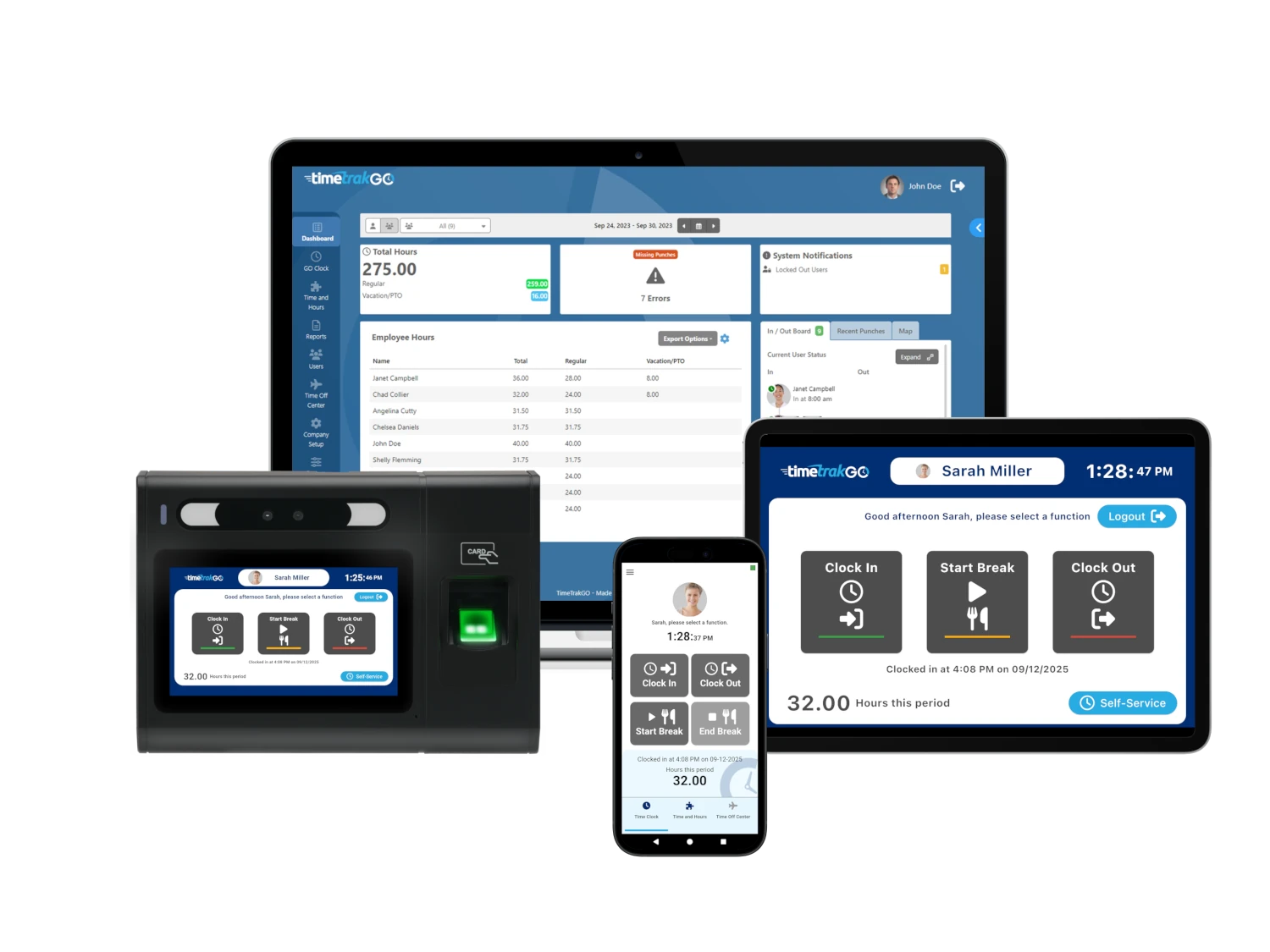
TimeTrak offers a flexible solution that turns tablets and mobile devices into biometric time clocks with fingerprint and facial recognition. Its features include dashboards, graphical time cards, PTO management, geofence and GPS tracking, and seamless payroll integrations with ADP, QuickBooks, and Paychex.
Start your free 14-day demo today and streamline workforce management.