
Fingerprint Time Clock for Employees
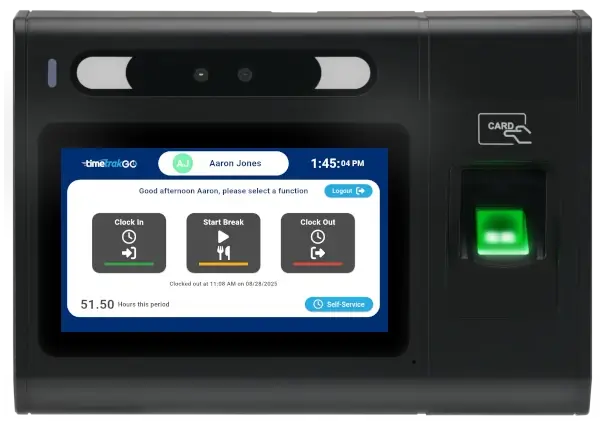
A fingerprint time clock identifies employees by their unique biometric data, not a badge they could hand to a coworker or a PIN someone else could punch in.
Every clock-in is tied directly to the person standing at the device. That single fact solves the two most common and costly problems in employee timekeeping: buddy punching and time theft.
TimeTrak offers fingerprint time clock hardware and software built specifically for small businesses. Setup takes minutes, employees enroll in seconds, and the system handles the rest automatically.


How a Fingerprint Time Clock Works
When an employee is added to the system, they complete a brief one-time enrollment by pressing their finger to the reader two or three times.
The device does not store a photograph or image of the fingerprint. Instead, it converts the unique characteristics of the print into an encrypted mathematical template. That template is what the device checks against every time the employee clocks in.
At clock-in, the employee presses their finger to the reader. The device matches the scan to the stored template, identifies the employee, and logs the punch in under a second. The correct punch type is selected automatically based on the employee’s current status. There is nothing to select, no card to carry, and nothing to remember.

The Real Cost of Buddy Punching
Buddy punching happens when one employee clocks in or out on behalf of a coworker who is running late, leaving early, or not there at all. With a PIN-based or badge-based clock, there is nothing to stop it. The employee just needs to know a number or borrow a card.
Research from the American Payroll Association estimates that buddy punching costs employers an average of 2.2 percent of gross payroll annually. For a business with a $500,000 annual payroll, that is roughly $11,000 per year walking out the door through a clock-in terminal.
A fingerprint time clock removes that vulnerability entirely. The employee’s finger is the only credential that works. It cannot be shared, forgotten, or lost.
What Happens to Employee Fingerprint Data
This is the question most employees ask before enrolling, and it deserves a direct answer.
TimeTrak’s fingerprint time clock does not store fingerprint images. The device captures specific data points from the print, converts them into an encrypted binary template using a mathematical algorithm, and stores only that template. The original fingerprint cannot be reconstructed from what is stored.
The template is used solely for the purpose of identifying the employee at clock-in. It is not shared with third parties, it is not used for any other purpose, and it is not transmitted off the device in a form that represents a fingerprint.
For businesses with employees who have privacy concerns about biometrics, this is worth communicating directly during onboarding. Most objections resolve once employees understand that no image of their fingerprint is stored anywhere in the system.
When a Fingerprint Time Clock Is the Right Choice
Fingerprint clocks are a strong fit for most small businesses, but a few factors are worth thinking through before purchasing.
It works well when: Employees share a single clock station and buddy punching is a real or suspected problem. There are no badges or credentials to manage and replace. You want the simplest possible clock-in experience with nothing for employees to carry. Your workplace is relatively clean and dry, as extreme conditions can affect fingerprint read rates.
Consider an alternative when: Employees frequently work with their hands in conditions that wear down fingerprint ridges, such as heavy manual labor, chemical handling, or extended glove use. Your state or local jurisdiction has specific biometric data regulations that require additional compliance steps. Some employees have medical conditions affecting their fingerprints.
The Software Behind the Clock
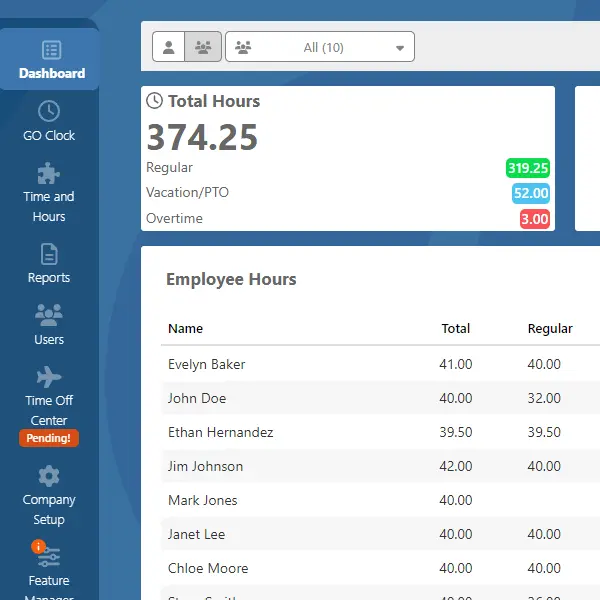
The fingerprint reader handles identification. TimeTrakGO handles everything that happens next.
Once a punch is recorded, the platform takes over automatically. What it manages for you:
- Overtime calculation based on your pay rules
- Paid time off accruals with running balances
- Employee time off request and manager approval workflow
- Scheduling with shift assignments and absence visibility
- Missed punch alerts
- Payroll export to QuickBooks, ADP, Paychex, and more!
- Employee self-service at the clock: view hours worked, recent punches, and PTO balance
Looking for a Simple Solution?
Check out our TimeTrakGO solution and see just how easy employee time tracking can be.